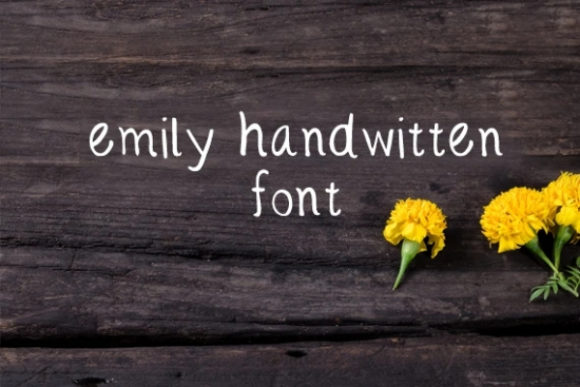
Emily: A Fresh and Cute Handwritten Font for Every Creative Project
When it comes to typography, the right font can make all the difference in how your message is received. Emily is a fresh and cute handwritten font that has gained popularity among designers, entrepreneurs, and creators looking for a personal, approachable style. Whether you're designing a greeting card, branding material, or a business card, Emily offers a unique touch that stands out. But while it's easy to fall in love with its charm, there are some key considerations to keep in mind to ensure you get the most out of this font.
Why Emily Is a Popular Choice
Emily is ideal for projects that require a warm, friendly, and authentic feel. Its soft, flowing letters mimic natural handwriting, making it perfect for wedding invitations, social media posts, and promotional materials where a human touch is essential. Many users find that Emily adds a sense of sincerity and creativity that more rigid fonts can't match. It’s especially popular among small businesses and independent creators who want to convey personality without sacrificing professionalism.
However, what makes Emily appealing also means it's not always the best choice for every project. Understanding its strengths and limitations is crucial to using it effectively.
Common Mistakes When Using Emily
One of the most frequent mistakes when working with Emily is overusing it. While the font is visually pleasing, using it for large blocks of text can reduce readability. Its cursive style may not be suitable for body copy, especially in digital formats where clarity is key. This can lead to poor user experience, particularly on websites or apps where quick scanning is necessary.
Another common issue is not considering the context. Emily works well for casual or artistic projects, but it might not align with the tone of more formal documents, such as legal contracts, academic papers, or corporate reports. Choosing the wrong font for the wrong setting can undermine your message and create confusion.
How to Avoid These Mistakes
To avoid overuse, consider using Emily as a headline or accent font rather than the primary text. Pair it with a more readable sans-serif or serif font for body content. This contrast not only improves legibility but also creates a balanced visual hierarchy. For example, use Emily for a title on a poster and a clean font like Arial or Helvetica for the supporting details.
Before finalizing your design, ask yourself: Does this font match the tone and purpose of my project? If you're unsure, test it in different contexts. Print it out, view it on a screen, and see how it looks in various sizes and backgrounds.
Choosing the Right Version of Emily
Emily is available in multiple versions, including regular, bold, and alternate styles. Each variation can affect the overall look and feel of your work. Some versions may have different character sets or spacing, which can impact how your text appears across devices and platforms.
A common oversight is not checking the license terms before downloading or purchasing Emily. Some fonts come with restrictions on commercial use, redistribution, or modification. Failing to review these details can lead to legal issues or unexpected costs down the line.
What to Check Before Downloading or Buying
Before using Emily, verify the licensing agreement. Ensure it allows for the intended use—whether it's for personal projects, commercial work, or resale. Also, check if the font includes all necessary characters, such as numbers, punctuation, and special symbols, especially if your project requires multilingual support.
Additionally, test the font in your preferred design software. Some fonts may not render correctly in certain programs, leading to formatting issues. Always download a trial version or sample to confirm compatibility before committing to a full purchase.
Best Practices for Using Emily
To maximize the effectiveness of Emily, start by defining your design goals. Are you aiming for a playful, romantic, or professional vibe? Emily can adapt to different moods, but it needs to be used intentionally. For instance, a wedding invitation might benefit from a more elaborate version of Emily, while a business card could use a simpler, cleaner variant.
Another tip is to experiment with color and layout. Emily’s soft curves can be enhanced with pastel shades or subtle gradients, creating a cohesive and eye-catching design. However, avoid overly bright or contrasting colors that might clash with the font’s delicate nature.
Realistic Examples of Effective Use
Consider a small bakery that wants to promote its new line of handmade cookies. Using Emily for the logo and headlines gives the brand a cozy, artisanal feel. Meanwhile, the menu items are written in a standard font to ensure clarity and ease of reading. This combination highlights the personality of the business while maintaining functionality.
Similarly, a blogger creating a motivational quote graphic might use Emily for the main text and a sans-serif font for the caption. This approach keeps the design engaging without overwhelming the viewer.
Final Thoughts
Emily is a versatile and charming font that can elevate a wide range of creative projects. Its handwritten style adds warmth and individuality, making it a favorite among designers and entrepreneurs. However, like any tool, it requires thoughtful application to achieve the best results.
By understanding its strengths, avoiding common pitfalls, and following practical guidelines, you can make the most of Emily in your designs. Whether you're crafting a personal message or building a brand, the right font can help you communicate more effectively and connect with your audience on a deeper level.